Ads 468x60px

Showing posts with label ANDROID. Show all posts

Monday, August 6, 2012

Samsung Galaxy Fit Gets Jelly Bean Nightly Build + Step By Step Flashing Guide


Jelly Bean is no doubt the most hyped and awaited version of Android. In March, 2012 it was a well searched term over the web and even after months of its release, it is not showing any signs of slowing down. Only few manufacturers have been kind enough to give the users an update for Jelly Bean in their android device and with the big giants but eligible devices, our fear of not getting an official update gets bigger. With dozens of devices getting Jelly Bean ports that, at least show the Jelly Bean interface or we can say Boot there is a high need for the manufacturers to wake up.


Among with many others, the Samsung Galaxy Fit has got an Unofficial Build of CyanogenMod 10 and works pretty well. All courtesy of the XDA senoir member TheWhisp we can now enjoy CM10 in the Samsung Galaxy Fit. The build for samsung galaxy Fit is quite working and there are only few glitches around the navigation. The main problems which on will have to face after installing this ROM are no camera, no USB tethering and echos during calls sometimes. Aside these problems the ROM works quite beautifully and is about ready for everyday use. The latest build is Nightly unofficial [4/8/12]. XDA Thread


What is working?

  • Touchscreen
  • Browser 
  • Some graphical glitches
  • SIM PIN lock
  • USB Mass Storage (UMS)
  • Su permissions (root)
  • Updater-script
  • Sound
  • Video playback (LQ in YouTube working perfectly, HQ laggs a little)
  • Stock and CM wallpapers
  • New kernel - 2.6.35.14
  • Triple buffering in the kernel
  • Voice search
  • Deep sleep
  • Project butter 
  • CM changes (theme support etc.)
  • Signal Bars
  • Lockscreen
  • All sensors
  • Genlock
  • ADB
  • SD card
  • Stock launcher 
  • Bluetooth 
  • Data & Network
  • Improved HWA
  • 3-pin headset
  • Mms.apk user agent and enabled splitting SMS'es


What is NOT working?

  • HQ video playback
  • Camera
  • Native USB tethering

Screen shots:


How To Flash/Install Jelly Bean On Your Galaxy Fit?

NOTE: All the data present in your Samsung Galaxy Fit S5670 handset should be backed up only with the help of below mentioned options. Don’t make use of KIES to back up the data as KIES won’t support the custom ROM firmwares. In the process of the firmware update, You will loose your data.

SMS – Use SMS Backup & Restore app,
Contacts – Sync with the Gmail application,
Call Log - Call Log and Restore
Images, Songs, Videos, Files – Copy to internal / External SD Card,
APN and MMS Settings – Note down from the path “Applications > Settings > Wireless and Network > Mobile Networks > Access Point Names”
Step #1 (Getting Jelly Bean): 
Download the latest version of ROM from here to PC.

Step #2:
Transfer the downloaded file to SD card of your device.

Step #3: (Rebooting into ClockworkMod Recovery)
To Flash Any Custom ROM you need to be installed ClockworkMod Recovery. Reboot the device into ClockworkMod Recovery mode by holding down volume up, home and power buttons together (Note: In recovery mode use volume keys to navigate and power button to select).

Step #4: 
In recovery mode, create a nandroid backup of your current ROM, it’s important because if anything not work out that you expect from this ROM, you’ll be able to easily revert back to your current state. To create backup select “Backup and Restore”, and then select “Backup” again.


Step #5: 
Perform full wipe, first select the wipe data/factory reset and confirm on the next screen.

Step #6: 
Select “Install Zip from SD Card” then “Choose Zip from SD Card” and locate the downloaded file that you’ve transferred in above step and confirm installation. Wait till installation complete.

Step #7: 
Once the installation is completed, select “Go Back” after that select “Reboot System Now.”

That’s it, you’re done, enjoy the Android 4.1 Jelly Bean on your Galaxy Fit and comment below for queries, you can visit the original thread of XDA for more information.

Sunday, August 5, 2012

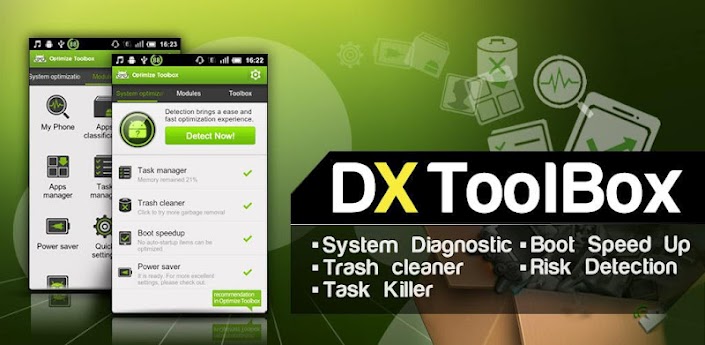
DX ToolBox - App2SD + Task Killer v2.6.6 Android App Apk


Requirements: Android 2.0+
Overview: DX ToolBox is a Swiss Army Knife for optimizing your Android phone.
Top 8 features to help you easily and efficiently manage your android phone.


DX ToolBox(Optimizer ToolBox) is one of the most powerful and comprehensive android assistant to improve your phone's performance by ☆ One-tap diagnosis and optimizing your phone, ☆ Cleaning storage, ☆ Freeing up memory, ☆ Killing background tasks, ☆ Batch (un)installing apps, ☆ Moving apps to SD card and ☆ Speeding up system booting, etc.
It’s Ad-Free!


Note: If you have trouble uninstalling, please go to Settings -> Location & Security -> Select Device Administrators and Uncheck DX ToolBox, then uninstall


★ Apps manager
  • Apps 2 SD (Android 2.2 or up): Automatic App-2-SD reminding;
  • Apps Classification helps you keep your App List tidy and clean;
  • App Installer/Uninstaller:Batch/single app(s)install/Uninstall
★ Task manager
  • To quickly kill background processes, speeding up your phone and extends battery life;
  • Periodically Automatic task(s) killing;
  • Long press apps to setup Ignore list (white list) or Killing list (black list)
 ★ System app(s)remover
  • System app(s) remover (root required);
  • Auto system application backup and one-tap restore
 ★ Trash Cleaner
  • Use Trash Cleaner to cleanup your phone / free up memory / free up space
  • 1 tap to erase history data, delete web history(web browser history), maps search history, earth history, YouTubehistory,clipboard data, market history, gmail history etc..
  • Global cache scanning, and one-tap to clear all the cached files (one-key clear)
 ★ Boot Speedup
  •  List the Allowed and Forbidden apps during booting;
  •  Kill booting processes after ROOT
 ★ Quick Settings
  • With the interesting Quick Settings tool and a desktop widget with 7 shortcuts, you could optimize your phone with less or even no manual operation.
  • Shake to optimize: shake to clean memory and shake to clean cache trash;
  • Turn over to mute the phone when phone call comes in;
  • Quick Restore network when connection to mobile network fails;
  •  2G/3G toggle(mobile data)
 ★ Desktop Widget
  •  A 7-button widget (17 functions foryour choice: WIFI switch, Bluetooth switch, Airplane mode, ringtone mode setting, process management, Cache cleaner, etc.)
  •  Change widget background color: Transparent/Gray/Translucent
  ★ System Diagnostic
  • One-tap detecting, list down details cumbering the system;
  • One-tap optimizing, keep the high score!
In addition, more tools could be found in __Toolbox__ page, such as RAM manager, web traffic governor, App Lock, etc.
DX ToolBox developed by Tapas is the first Android optimizing tool. After its debut three years ago, it has enjoyed great reputation among millions and millions of users all over the world. DX ToolBox, as a master of android system, dedicatesto fixing the low-efficiency and inconvenience on Android system and providing efficient maintenance for your Android device!

Download Instructions


Mirrors:
FilesMarket
DepositFiles

Thursday, August 2, 2012

Google Announces The Official Android Blog


Google loves them some blogs. Followers of El Goog have long been able to search through the companies hundreds of official blogs for information ranging from their legal stances, to search algorithm updates, to mobile products. But there had never been an official blog dedicated to Android – it always was lumped into the mobile blog, which covers the entire range of Google products across all mobile platforms.

Until now that is, as Google used their mobile blog to announce the creation of an official blog dedicated to Google’s Android announcements. The blog received something of an artificial history by reproducing many of the major Android announcements made on the mobile blog, but it really got its start today with the announcement of a major overhaul of Google Wallet. 

Google’s official blogs aren’t made to be daily reads – they only post when they have a product or service to announce. And you can rest assured that any exciting information posted there will finds its way onto our pages along with the rest of the day’s mobile news. Still, if you’re the type that likes to check constantly for new information, or are just curious to see what Google will do with their new blog devoted to the little green robot, head to the source link to check it out.

source: Google 1,2 via Droid-Life

Monday, July 9, 2012

CyanogenMod 10 will only arrive after stable CM 9 is ready, says CM Team

 
The developers at the CyanogenMod project have outlined their plans for the next major release of their popular modified Android firmware, CyanogenMod 10 (CM10). In a post on Google+, they say that CM10 – which will be based on the source code for Android 4.1 "Jelly Bean" – should take far less time to develop than CyanogenMod 9 (CM), which still isn't finished, and that a majority CM9-compatible devices will be supported.
Version 9 of the open source custom ROM, currently only available as a release candidate, has taken the developers longer than the project's previous releases. This is because the team decided that "it would be best and most efficient to essentially rewrite CM enhancements from scratch" because of the big changes between Android 2.3 "Gingerbread" (CM7) and 4.0 "Ice Cream Sandwich" (CM9). "This added a bit of time to our development cycle, but the initial investment in cleaning our codebase has paid off, and CM9 is better for it," added the developers.
The team says that it is looking forward to Google's "Project Butter" performance enhancements, noting that the optimisations "should not be a huge pain to merge". However, the developers point out that, as they do not have access to the source for Android 4.1 yet, they can't provide a detailed analysis, but they anticipate having to refactor the "Trebuchet [CyanogenMod's Launcher] and the LockScreen enhancements, along with the Theme Engine". As is usually the case with CyanogenMod, the developers point out that CM10 will be released "When it's ready".
In a recent presentation video from an Android User Group Meetup, CyanogenMod founder Steve Kondik and other developers provide insight into how the community-built custom ROMs fit into the Android landscape and the project's goals:

Friday, July 6, 2012

When Will You Get Android 4.1 (Jelly Bean) ?

 
Although the next version of Google's mobile operating system, Android 4.1 (Jelly Bean), is expected to go live later this month, there will be a lag, as usual, between release time and when you might see the OS on your Android device.
That's because the handset makers, not Google, determine when to allow upgrades to their smartphones. The arrangement is supposed to foster innovation, but it also fosters frustration among users who can't get the latest version of Android in a timely manner--or in some cases, at all. It has also fostered a fragmented ecosystem that's vulnerable to attacks by hackers.
Aware of the "instant gratification" problem with Android, Google made a move to address it at last week's I/O developers conference with the release of a Platform Development Kit (PDK) for its OEMs. The kit does for hardware makers what a Software Development Kit (SDK) does for software writers.
However, even if PDKs speed up the adoption process, they aren't likely to have much impact on the initial release of Jelly Bean. Android 4.2 or even 5.0 may be released before many users see Jelly Bean--if they ever do. After all, Jelly Bean's predecessor, Ice Cream Sandwich, introduced in October 2011, is currently on only 10 percent of Android devices.


Which Phones And Tablets Will Get Android 4.1?

 
Samsung Galaxy Nexus
The Samsung Galaxy Nexus will be the first device to receive an Android 4.1 Jelly Bean update. Google has confirmed that the update will be rolling out in July.
Samsung Nexus S
Google has said the aim is to get the Nexus S running Android 4.1 Jelly Bean in mid-July 2012. Samsung users using the Nexus S will get an over the air update in mid-July. Exact details have yet to be confirmed.
Google Nexus 7 Tablet
Google announced its first tablet computer (TheAsus-made Nexus 7) last week. Google’s Nexus 7 ($199 for 8GB, $249 for 16GB) is a game-changer. Nexus 7 is the first tablet to launch with Android 4.1 Jelly Bean.
Motorola Xoom
Motorola Xoom users will also be getting an Android 4.1 Jelly Bean update in mid-July. No exact details on when the over the air update will be out however, or whether the update will also come to the Motorola Xoom II.

Phones And Tablets Should Get Android 4.1

 
Samsung Galaxy S III
Samsung Galaxy S3 is right now the latest and the most expensive Android phone in the market. So Galaxy S3 should definitely get an Android 4.1 Jelly Bean update. Samsung hasn’t confirmed it, but we expect it to be amongst the first to roll out Jelly Bean.
HTC One X
HTC One X is the best-selling phone of the HTC One series. It is powered by a Quad Core Processor.  So HTC One X should definitely get an Android 4.1 Jelly Bean update.
Asus Eee Pad Transformer Prime
Asus Eee Pad Transformer Prime is a quad-core CPU tablet. Also Jelly Bean is optimized for quad-core processors. Therefore Asus Eee Pad Transformer Prime should definitely get an Android 4.1 Jelly Bean update.
Asus Transformer Pad 300
The Asus Transformer Pad 300 launched with Android 4.0 Ice Cream Sandwich. Therefore Asus Transformer Pad 300 should definitely get an Android 4.1 Jelly Bean update.
Asus Transformer Pad Infinity
The Asus Transformer Pad Infinity is launching with Android 4.0 Ice Cream Sandwich. Therefore Asus Transformer Pad Infinity should definitely get an Android 4.1 Jelly Bean update.
Samsung Galaxy Tab 2
Samsung Galaxy Tab 2 (7-inch and 10-inch) was launched just months ago with Ice Cream Sandwich as its operating system. Therefore Samsung should have no problems in giving Galaxy Tab   2 an Android 4.1 Jelly Bean update.

Slider